Eren Retail - Virtual Try-On Experience
Role
UX, UI, and Motion Design (end-to-end)
Client
Eren Retail — House of SuperStep (a multi-brand retailer serving brands like Gant, Nautica, Lacoste...)
Tools
Figma, Google AI Studio (prototyping), Claude & Gemini (research/analysis assistants), Google Forms

The Product
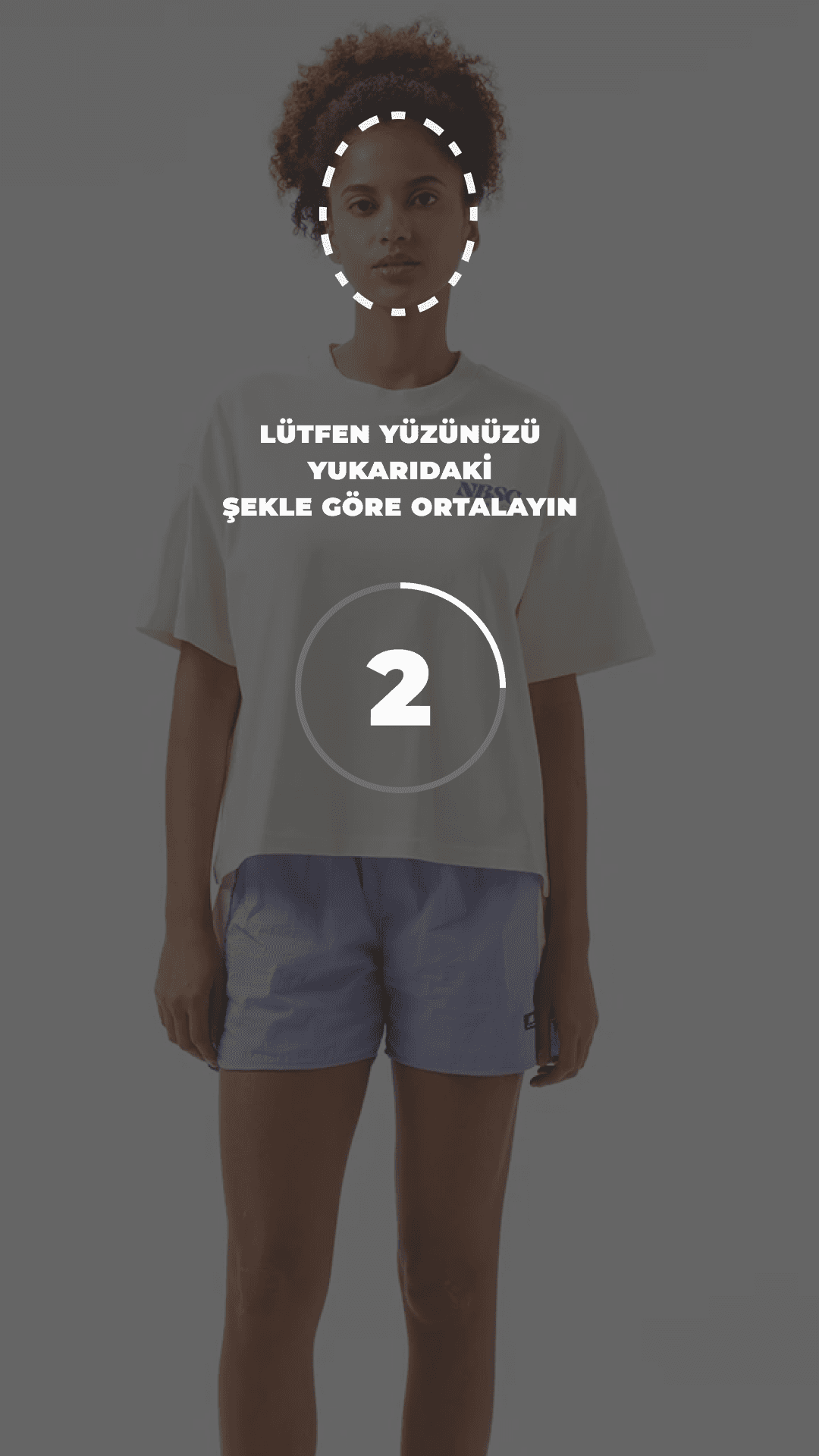
An interactive in-store kiosk that allows shoppers to instantly browse inventory, take a quick photo, and virtually try on garments, eliminating the need for fitting room queues while streamlining the overall shopping journey.
1-Context & Business Impact
Eren Retail operates an extensive retail network housing major global fashion brands. To alleviate the heavy operational load on sales associates during peak hours and digitize in-store product discovery, we initiated the Virtual Try-On Kiosk project.
Business Goals
Reduce In-Store Friction: Decrease fitting room queues and relieve sales associates from manual stock checks and product fetching.
Streamline Multi-Brand Discovery: Enable customers to effortlessly search and discover products across a vast multi-brand inventory.
Drive In-Store Conversions: Speed up the try-on process to enhance customer satisfaction and boost in-store sales efficiency.
2-Core UX Innovation: The "Batch Try-On" Flow
The Problem with the Legacy Flow
In the initial setup, users had to select a single product, tap "Try On," and repeat the entire process from scratch for every single item. This created long bottlenecks at the kiosk and caused unnecessarily high dwell time.
My UX Solution
Borrowing the familiar e-commerce shopping cart logic, I adapted it into a physical store experience through a "Batch Try-On Basket" model:
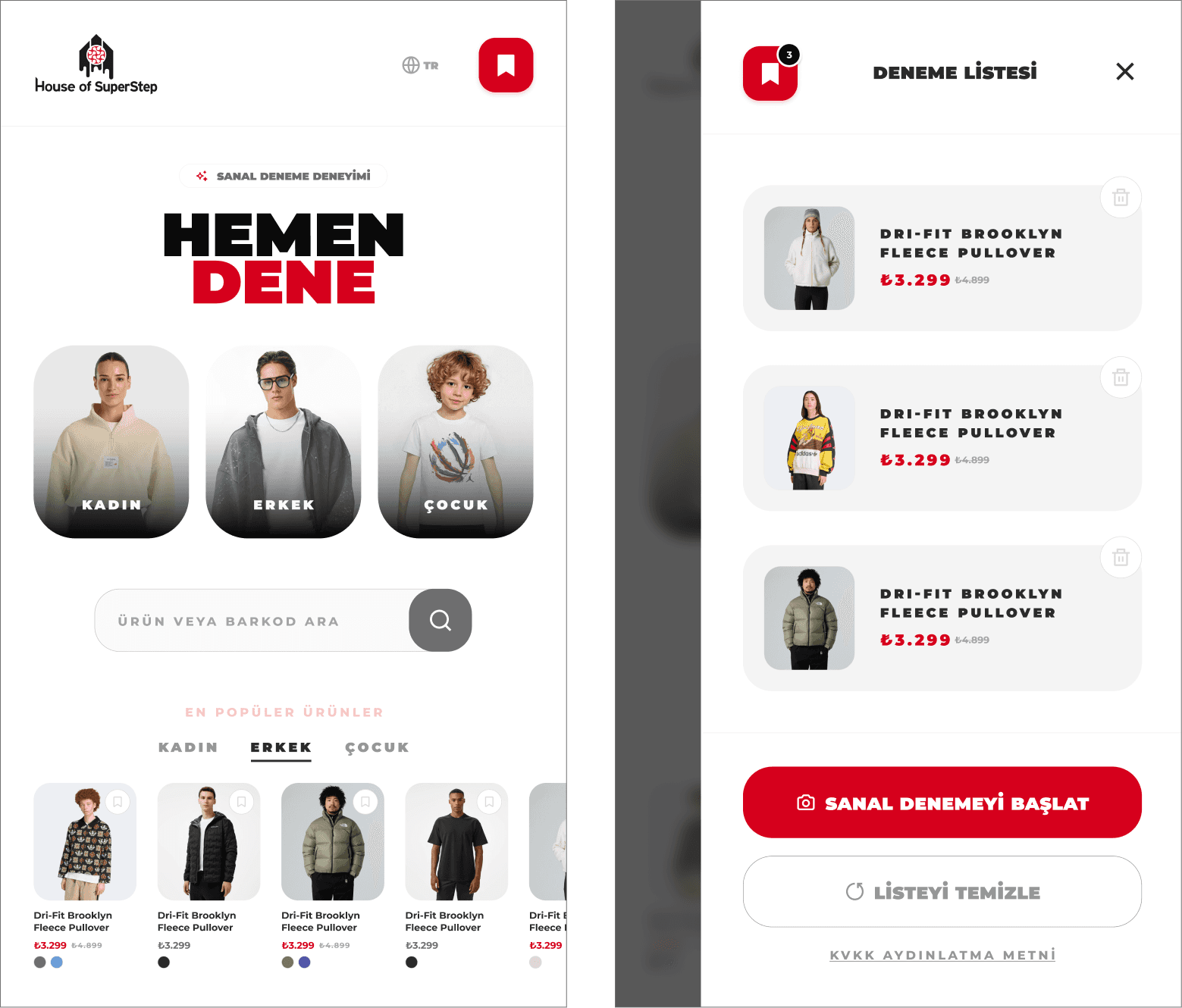
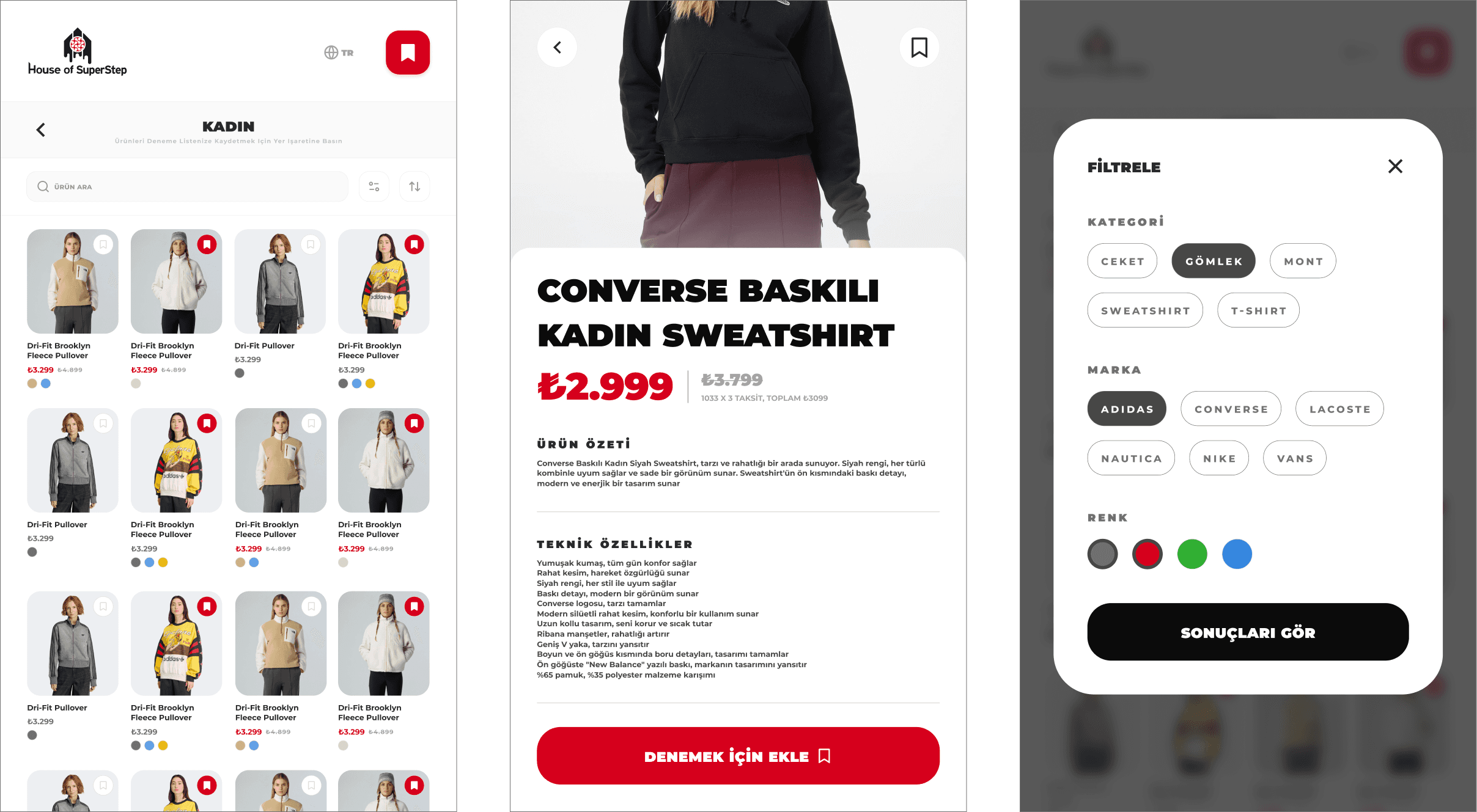
Dashboard & Discovery: Designed a clean home screen featuring a search bar, gender categories (Women, Men, Kids), and a horizontally scrollable "Top 5 Most Tried-On Products" showcase beneath each category.
Collect First, Try Later (Batch Try-On): Instead of forcing immediate individual try-ons, users browse or search items and add them to a top-right Try-On Basket.
Flexible Basket Management: Users can open their basket anytime to view, delete, or swap colors/sizes before committing to a try-on session.
One-Click Try-On Session: Once ready, tapping "Let’s Try On" launches a seamless, sequential virtual try-on session for all selected items at once.
3-Tech Constraints, Compromises & Design Trade-offs
I owned the interaction logic and made strategic UX compromises driven by technical and business constraints:
Hardware & API Limitation (Static Photo Overlay vs. Live Video):
Constraint: Kiosk hardware, camera specs, and backend rendering APIs could not support real-time video rendering.
Trade-off: Pivoted to a fast, reliable snap-and-overlay photo model to ensure high performance without sacrificing visual quality.
Store-Bound Inventory Limits:
Constraint: Cross-store real-time inventory API integration was not ready for phase one.
Trade-off: Deferred the "Out of stock here, but try it on and ship to store" concept to later phases, strictly displaying real-time local store stock to maintain user trust.
Product Basket Cap:
Constraint: Need to optimize kiosk queue times and prevent system performance drops.
Trade-off: Enforced a hard limit of 10 items per session to keep session times focused and the flow moving smoothly.
No In-Kiosk Payment → Order Collection Workflow:
Constraint: Physical POS/Payment terminals were intentionally excluded from the kiosk hardware scope.
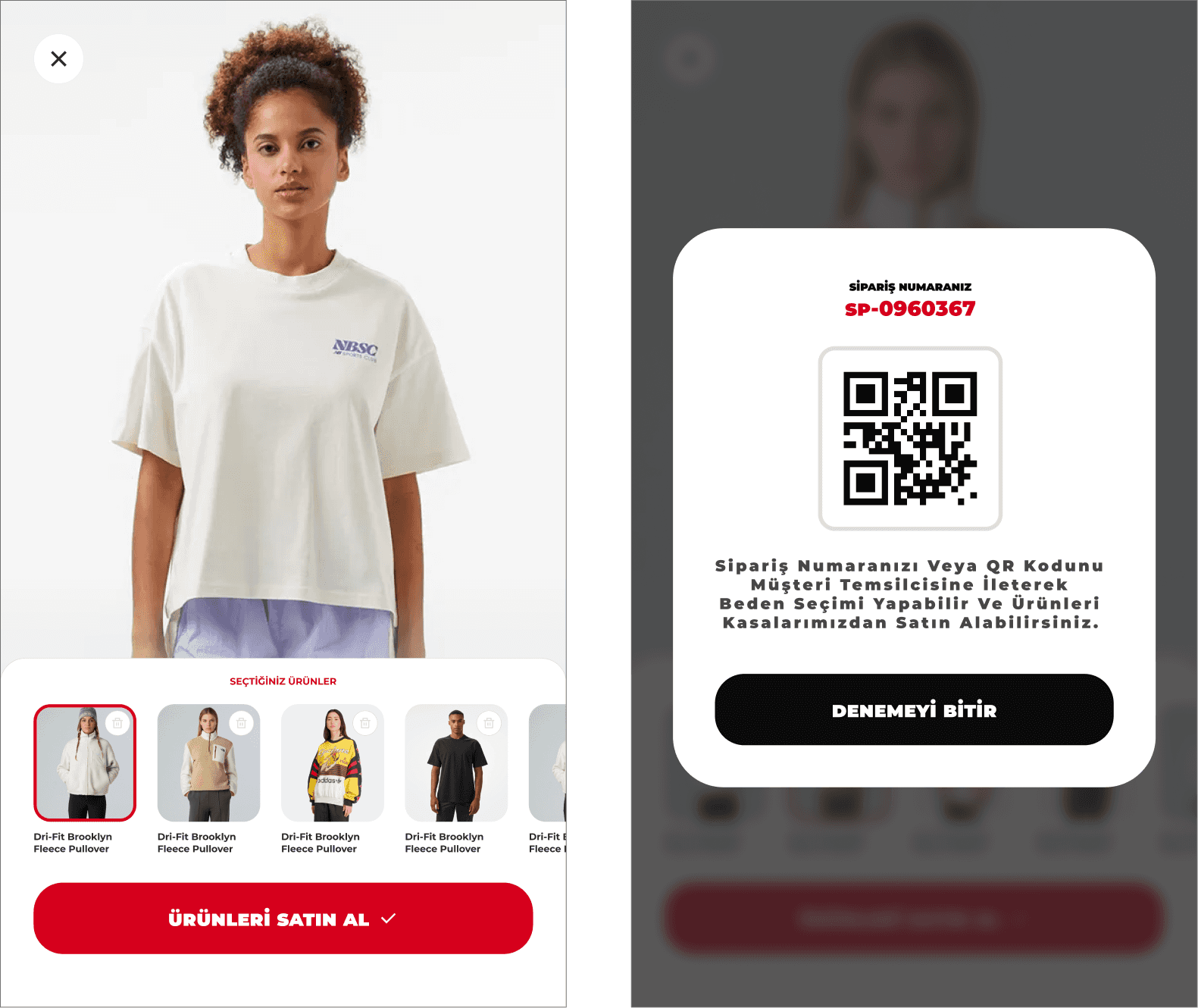
Trade-off: Collaborated with engineering to build an "Order Collection (Pickup)" workflow. Replacing the "Buy Now" button, users select items for a "Request via Sales Associate" action. The kiosk generates a Pick-Up Order Number & Stock List that routes instantly to the associate’s handheld tablet for back-room fetching.
4. End-to-End Process & AI-Assisted Methodology
UX Audit & Heuristic Evaluation: Evaluated the existing kiosk interface to identify drop-off points and usability flaws.
AI-Enhanced Logic Refinement: Used Claude AI to stress-test alternative user scenarios, refine logic, and map edge cases.
Interactive AI Prototyping (Google AI Studio): Built functional, interactive prototypes using Google AI Studio to turn static concepts into a playable MVP.
Internal Field Testing: Conducted pilot testing with Eren Retail corporate teams and store associates.
AI-Powered Feedback Loops: Designed feedback forms via Google Forms and processed qualitative feedback from store teams using Claude & Gemini to categorize and prioritize UX fixes.
Iterative Refinement: Updated the prototype based on priority feedback; secondary test rounds confirmed no major UX friction remained.
Adaptive Design System (Figma):
Built a scalable, Adaptive Design System designed to support multiple brands (House of Super Step, Lacoste, Gant, Nautica, Converse).
Tokenized colors and typography to allow instant dynamic skinning per brand.
Created responsive component sets optimized for both large in-store kiosk displays and store associates' handheld tablets.
Motion Design: Added micro-interactions and transitions to make touch gestures feel intuitive and responsive on large screens.
5. Quantitative & Qualitative Results
Data measured and calculated by Eren Retail store operations:
📊 65% Fitting Room Adoption: Approximately 65% of customers heading to fitting rooms actively engaged with the kiosk.
⭐ 80% User Satisfaction Rate: 80% of users reported high satisfaction with the virtual try-on experience.
💬 Customer Feedback: The primary qualitative takeaway: "I was able to try on multiple items virtually and quickly without wasting time."
🏬 Sales Associate Feedback:
Zero disruption to daily store routines; reduced manual fetching back-and-forth.
Clear display of product codes, live pricing, and exact stock availability on screen allowed associates to assist customers with speed and precision.
Project Gallery